
How to reconcile VAT across Amazon, Shopify, Stripe and EU OSS returns
How to reconcile VAT across Amazon, Shopify, Stripe and EU OSS returns
How to reconcile VAT across Amazon, Shopify, Stripe and EU OSS returns
You sell on Amazon and through a Shopify store, with Stripe processing the store’s card payments. At quarter end, sales records and bank deposits don’t match. Part of the gap is commissions and payment fees; the rest is refunds, settlement timing and VAT rules.
That’s why a VAT return built from payout figures goes wrong. VAT reconciliation fixes it by working at transaction level: every sale, refund and fee is matched across platforms, classified for VAT and only then totalled for the domestic return and the EU OSS return. Below is the process, with a worked example you can reproduce.
What is VAT reconciliation and why does it matter?
VAT reconciliation means matching sales, refunds and payment records from every channel so that reported figures agree with the underlying transactions. In ecommerce it separates amounts that are easy to blur:
- what the customer paid, including VAT
- the taxable amount excluding VAT
- the output VAT charged to the customer
- marketplace and payment processing fees
- the net payout that reaches your bank
- the VAT you actually owe
A settlement report tells you what was paid out. It doesn’t tell you the VAT position.
Take a €120 sale including €20 VAT, with a hypothetical €3 processing fee. The business receives €117.
Customer payment €120, taxable amount €100, output VAT €20, fee €3, net settlement €117. The fee doesn’t reduce the VAT due on the sale, because the taxable amount is the consideration obtained from the customer (VAT Directive, Article 73). VAT on the fee itself is a separate question. Only transaction-level data shows all of these figures at once.
Why Amazon, Shopify and Stripe reports do not match
Each platform records a different stage of the same sale.
Amazon sales and settlement reports
The Amazon VAT transactions report covers sales, returns, refunds, cross-border inbound shipments and transfers between fulfilment centres. Its fields include departure and arrival country, VAT-exclusive value, VAT amount and tax collection responsibility (Amazon SP-API documentation)
Settlement reports are generated automatically, with an amount type and description for each sale, fee and adjustment (Amazon settlement reports). The net payout mixes all of these, so copying it into a return understates sales. For Amazon VAT reporting, start from transaction data and use settlements to prove the cash.
Shopify orders and tax reports
Shopify records orders, taxes, discounts, refunds, shipping charges and payment status in its order export and tax reports. An order total isn’t what you eventually receive, because fees and refunds sit elsewhere. Shopify VAT reporting is only as good as the store’s tax settings; our Shopify VAT setup guide covers them.
Stripe payments and payouts
Stripe separates charges, refunds, fees, adjustments and payouts. A refund creates its own balance transaction rather than changing the original charge (Stripe balance transaction types), and the payout reconciliation report groups the transactions in each payout.
Here, Stripe processes only the Shopify store’s payments; Amazon settles its own sales. With Shopify Payments, use Shopify’s payout reports the same way.
| Platform | Primary data | Common adjustments | Reconciliation purpose |
| Amazon | Sales and VAT transaction records | Fees, refunds, settlements | Marketplace sales reconciliation |
| Shopify | Orders and tax records | Discounts, returns, cancellations | Store sales reconciliation |
| Stripe | Charges and balance transactions | Processing fees, refunds, payouts | Payment reconciliation |
Amazon and Shopify describe the sale; Stripe describes the money. Stripe reconciliation confirms payment and fees but can’t give the VAT treatment.
What data do you need before reconciling VAT?
Amazon reports
Download the VAT Transactions Report, VAT calculation records where you use them, settlement reports, refund details and fee invoices where applicable.
Shopify reports
Export orders, tax reports, refunds, discount details and, where relevant, shipping and fulfilment data.
Stripe reports
Pull balance transactions, charges, refunds, processing fees and the payout reconciliation report.
Aim to hold these fields for every transaction:
- Transaction ID
- Order ID
- Transaction date
- Relevant tax point date
- Sales channel
- Customer country
- Country of dispatch
- Customer type (B2B or B2C)
- Transaction currency
- Gross amount
- Taxable amount
- VAT amount
- VAT rate
- Refund amount
- Marketplace or processing fees
- Net settlement amount
- Marketplace VAT collection status
- Applicable reporting scheme
No single export holds all eighteen; some must be matched across reports or derived. OSS records must also show the customer’s location and the date and type of supply, kept for ten years (European Commission).
How to reconcile VAT across Amazon, Shopify and Stripe step by step
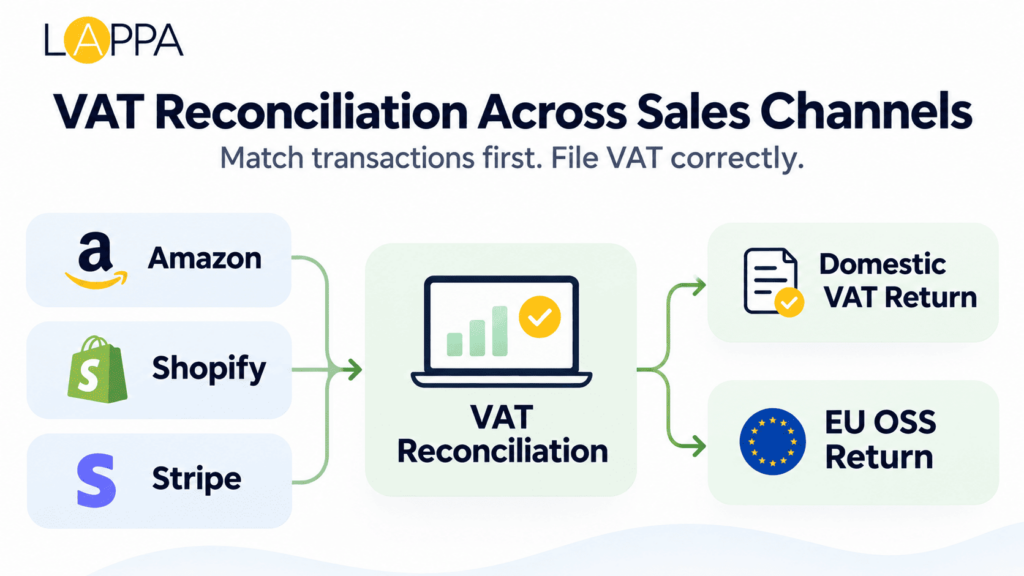
Step 1. Export transaction data from each platform
Download the reports above for the same period. Transaction, settlement and VAT reporting dates can all differ; Stripe selects payouts by when they affect your balance, not your bank. Amazon’s VAT Transactions Report can change when re-run, so save the version you used.
Step 2. Standardise the transaction data
Bring everything into one layout. Standardise dates, currencies, identifiers and country codes, mark whether amounts include VAT, store refunds as negatives and label each row’s channel. Watch number formats: Amazon’s EU settlement files use decimal commas.
Never import the same Shopify order twice: the Shopify order and the Stripe charge are one sale, so the Stripe row confirms payment and fees, not revenue.
Step 3. Match orders with payment transactions
Join Shopify orders to Stripe charges using order IDs and payment references. Then handle missing, multiple, split and failed payments, partial refunds and delayed settlements. Every unmatched item needs an explanation.
Step 4. Separate taxable sales from fees and adjustments
Record Amazon commissions and Stripe fees as costs in their own columns; they don’t reduce the taxable amount. Keep reserves and chargebacks apart until you know what they relate to.
Step 5. Classify each sale by VAT treatment
Identify dispatch country, customer country and type, your registrations and the scheme. Check whether Amazon is the deemed supplier, which happens only in defined cases such as EU sales by sellers not established in the EU (VAT Directive, Article 14a).
Step 6. Match transactions to the correct reporting period
VAT generally becomes chargeable when goods are supplied (Article 63); deemed-supplier sales follow the payment acceptance date (Article 66a). The payout date isn’t the test, so an order supplied on 30 September stays in Q3 even if the money lands in October.
Step 7. Calculate VAT totals and investigate discrepancies
Group validated transactions by category, country and rate, then look for missing items, duplicates, wrong rates, unmatched refunds, currency differences, marketplace-collected VAT counted as yours and sales in the wrong period. Cash should then tie back to settlements once fees and refunds are added.
Step 8. Prepare and review the VAT returns
Use the reconciled totals for both returns, after someone confirms treatment, rates and scheme rules.
Practical example of ecommerce VAT reconciliation
This ecommerce VAT reconciliation example uses one quarter of trading for a company established in Germany. The assumptions are:
- it holds stock only in Germany and is VAT-registered there
- it uses Union OSS for qualifying B2C distance sales, having exceeded or opted out of the €10,000 EU threshold
- all transactions fall in the same quarter, and all customers are consumers
- standard rates apply: 19% in Germany, 20% in France, 22% in Italy
- Amazon isn’t the deemed supplier, because the seller is established in the EU
- fees are hypothetical, and all amounts are in euro
| Transaction | Gross amount | VAT treatment |
| Shopify sale from Germany to France | €120 | €100 taxable base + €20 French VAT |
| Partial refund of the French sale | −€24 | −€20 taxable base and −€4 VAT |
| Shopify domestic sale in Germany | €119 | €100 taxable base + €19 German VAT |
| Amazon domestic sale in Germany | €119 | €100 taxable base + €19 German VAT |
| Amazon sale from Germany to Italy | €122 | €100 taxable base + €22 Italian VAT |
Stripe fees total €6 and Amazon fees €19. Before considering the VAT treatment of those fees:
- total customer sales after the refund: €456
- taxable sales excluding VAT: €380
- output VAT: €76
- processing and marketplace fees: €25
- net settlements after fees: €431
| Reporting category | Taxable amount | Output VAT |
| German domestic VAT | €200 | €38 |
| Union OSS France | €80 | €16 |
| Union OSS Italy | €100 | €22 |
| Total | €380 | €76 |
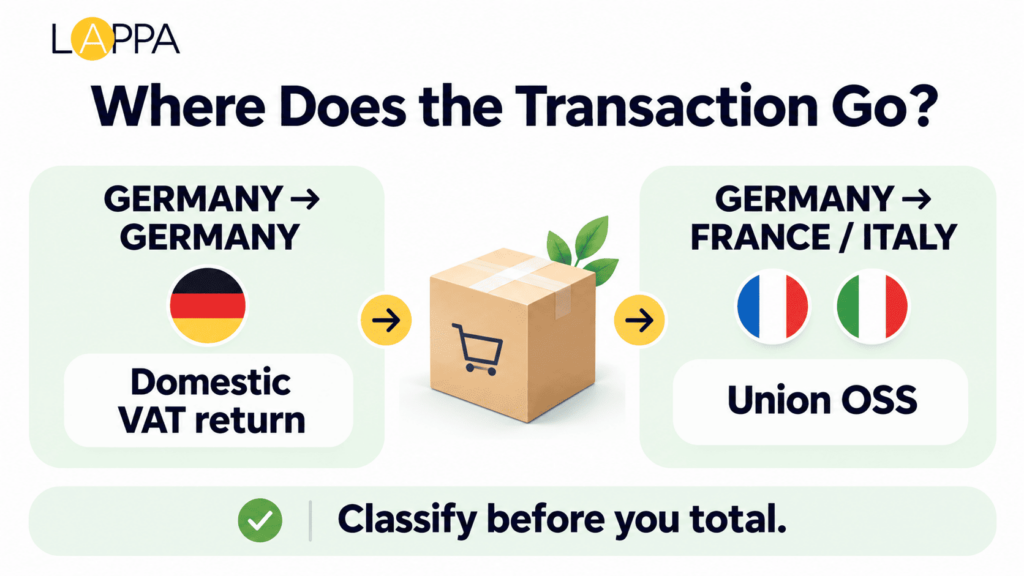
The two German sales go into the German domestic return. The French and Italian sales are intra-Community distance sales, so they go into the Union OSS return. The refund fell in the same quarter, so it reduces the French figures before filing.
Illustrative standardised dataset (not an actual Amazon, Shopify or Stripe export format):
|
source,transaction_id,date,dispatch,destination,gross,refund,fees,taxable,vat,category Shopify/Stripe,SH-1001,2026-11-04,DE,FR,120.00,0.00,3.00,100.00,20.00,OSS-FR Shopify/Stripe,SH-1001-R1,2026-11-18,DE,FR,0.00,-24.00,0.00,-20.00,-4.00,OSS-FR Shopify/Stripe,SH-1002,2026-11-06,DE,DE,119.00,0.00,3.00,100.00,19.00,DOMESTIC-DE Amazon,AMZ-2001,2026-11-09,DE,DE,119.00,0.00,9.00,100.00,19.00,DOMESTIC-DE Amazon,AMZ-2002,2026-11-12,DE,IT,122.00,0.00,10.00,100.00,22.00,OSS-IT |
The business banked €431, but its taxable turnover was €380 and its output VAT €76. Neither figure is on the bank statement.
How to handle refunds, marketplace fees and currency conversion
Refunds and partial refunds
Full and partial refunds reduce the taxable amount under conditions set by each Member State (Article 90). Timing decides the mechanics of OSS VAT reconciliation: a credit note in a later quarter corrects the return in which the sale was declared, via a subsequent return within three years (European Commission). Domestic returns follow national rules. Keep refund evidence linked to the original sale.
Amazon and Stripe fees
Fees are what you pay the platform, not a discount to your customer. Report the sale at its full taxable amount and book fees as costs; whether they carry VAT or fall under the reverse charge is an input-side question.
Currency conversion
Sales may be in zloty or Swedish krona while your return is in euro. For OSS, the Commission requires the European Central Bank rate published on the last date of the tax period, which won’t usually match Stripe’s or Amazon’s rates. Domestic returns follow national rules. Document one method and expect small rounding differences.
How to reconcile VAT for EU OSS and domestic VAT returns
OSS VAT reconciliation starts by splitting transactions into the right routes. OSS doesn’t replace domestic obligations: supplies from Germany to German customers stay on the German return, and stock held abroad can trigger further VAT registration.
Amazon doesn’t collect VAT on every sale either. It’s the deemed supplier for EU sales by sellers not established in the EU and for imported consignments up to €150. Where it is, that VAT isn’t your output VAT; check the tax collection responsibility field before building totals.
| Transaction type | Potential reporting route | Main reconciliation consideration |
| Domestic sale | Domestic VAT return | Local tax treatment |
| Qualifying intra-EU B2C distance sale | Union OSS | Destination country and applicable VAT rate |
| Marketplace deemed supplier transaction | Depends on transaction structure | Avoid treating marketplace-collected VAT as the seller’s output VAT |
| B2B cross-border transaction | Depends on transaction | Customer status and applicable rules |
| Refund | Depends on original transaction and correction rules | Link to original sale and relevant period |
This is a simplified decision aid, not a full classification; our guide to B2B and B2C VAT rules covers customer status. Cross border VAT reporting depends on this split being right before any number reaches a return.
Common VAT reconciliation mistakes ecommerce businesses should avoid
- Using net Amazon payouts as turnover. Fees and refunds are netted off, so sales are understated. Start from transaction reports.
- Deducting Stripe fees from sales. The taxable base shrinks and VAT is underpaid. Book fees separately.
- Double-counting Shopify and Stripe. Revenue doubles. Use Stripe only to confirm payment.
- Counting marketplace-collected VAT as yours. The VAT is paid twice. Filter on collection responsibility.
- Wrong destination rate. A French sale taxed at 19% understates French VAT. Map rates by destination.
- Wrong period. Payout dates push sales into the next quarter. Use the tax point.
- Missing or repeated refunds. VAT is overstated or understated. Link each refund to its order.
- Mixing domestic and OSS sales. German sales end up on the OSS return. Classify before totalling.
- Inconsistent currency conversion. The audit trail breaks. Document one method per return type.
When should ecommerce businesses automate VAT reporting?
Spreadsheets cope with a few hundred transactions. More channels, registrations, currencies, deadlines, refunds or legal entities each add matching rules and exceptions, and that’s when automated VAT reporting starts paying for itself.
When comparing tools, look for:
- transaction data import from each channel
- country-level reporting and VAT treatment classification
- VAT calculations and support for OSS and domestic returns
- validation and exception handling
- records that support a VAT audit trail
Not every product covers all of these, so test VAT reporting software against your own data. Automation removes repetitive matching, but someone still reviews the exceptions.
VATCompliance.co offers VAT compliance software that calculates VAT, monitors registration thresholds, supports OSS and IOSS workflows and prepares returns from imported transaction data. Its integrations include Amazon, Shopify and Stripe connectors. Check which data each connector imports before relying on it for marketplace VAT reporting